Site photo evidence · UK Building Control

The easiest way to prove what happened on site.

Photos, plans and evidence — captured correctly before anyone asks for it. Timestamped, geo-stamped and pinned to the floor plan as your team works. SiteRecord is live and in daily use on UK sites today.

Start free — no card. Every SiteRecord feature is yours for your first 14 days, then keep Free forever or upgrade for £29/month (£24 billed yearly). Unlimited site users included.

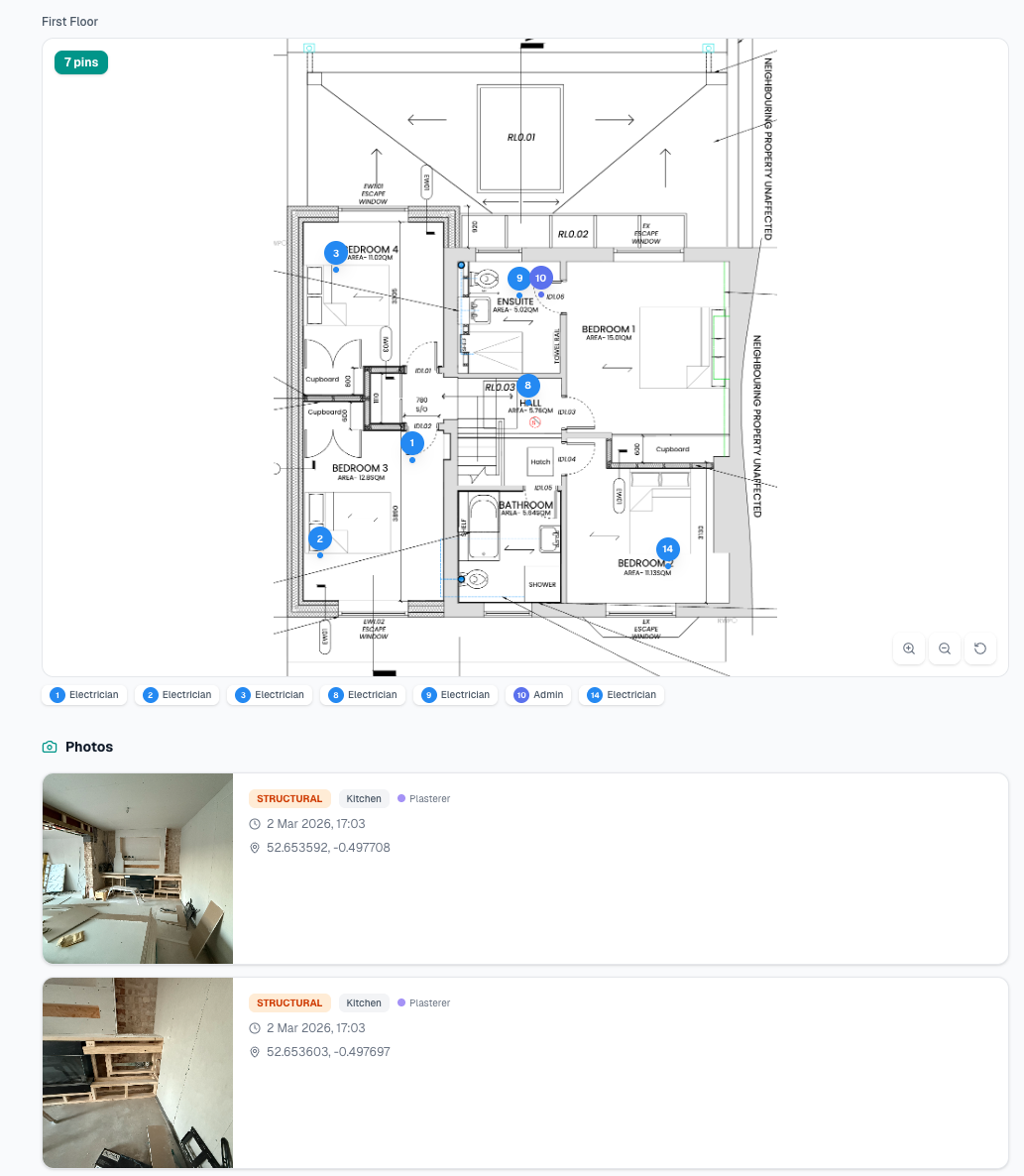
Arqor SiteRecord — floor plan with numbered photo pins from a live UK building project
SiteRecord — live, in daily use with UK contractors
Part L Appendix B ready GDPR compliant · Encrypted evidence Built in the UK
Live now

SiteRecord

Site photo evidence built for UK Building Control — in market and serving contractors today.

Building inspectors now require timestamped, GPS-tagged photographic evidence at every stage. Your trades are sending photos via WhatsApp and nobody can find anything when the inspector asks.

SiteRecord fixes this. Three steps, zero friction.

1

Set up a job

Create a job, upload your floor plans. Arqor generates a unique QR code for each site.

2

Trades scan & snap

No app download. No account. Trades scan the QR, take photos, pin to floor plans, add notes. Everything timestamped and GPS-tagged automatically. Works offline.

3

You see everything

Dashboard, floor plan view, timeline, grid, map. Share a read-only link with your inspector or client. Generate PDF reports with one tap.

Set up jobs and manage your team on desktop. Capture on any phone. Same account, same login.

See it in action

Dashboard, floor plan, timeline.

Everything your inspector needs in one place.

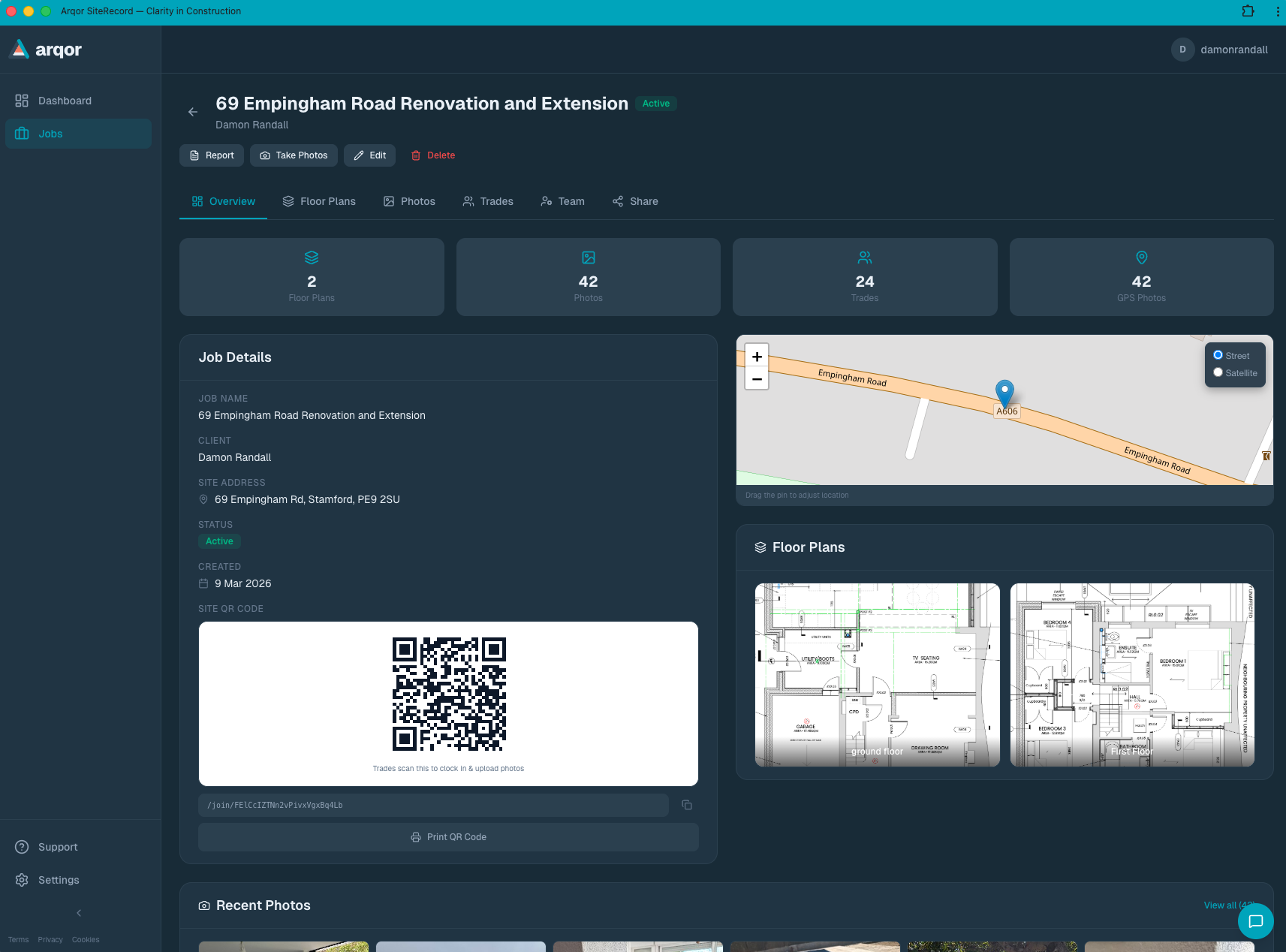
Arqor SiteRecord dashboard — job overview with 42 photos, floor plans, QR code and site map
Every job, every photo, every trade — one view
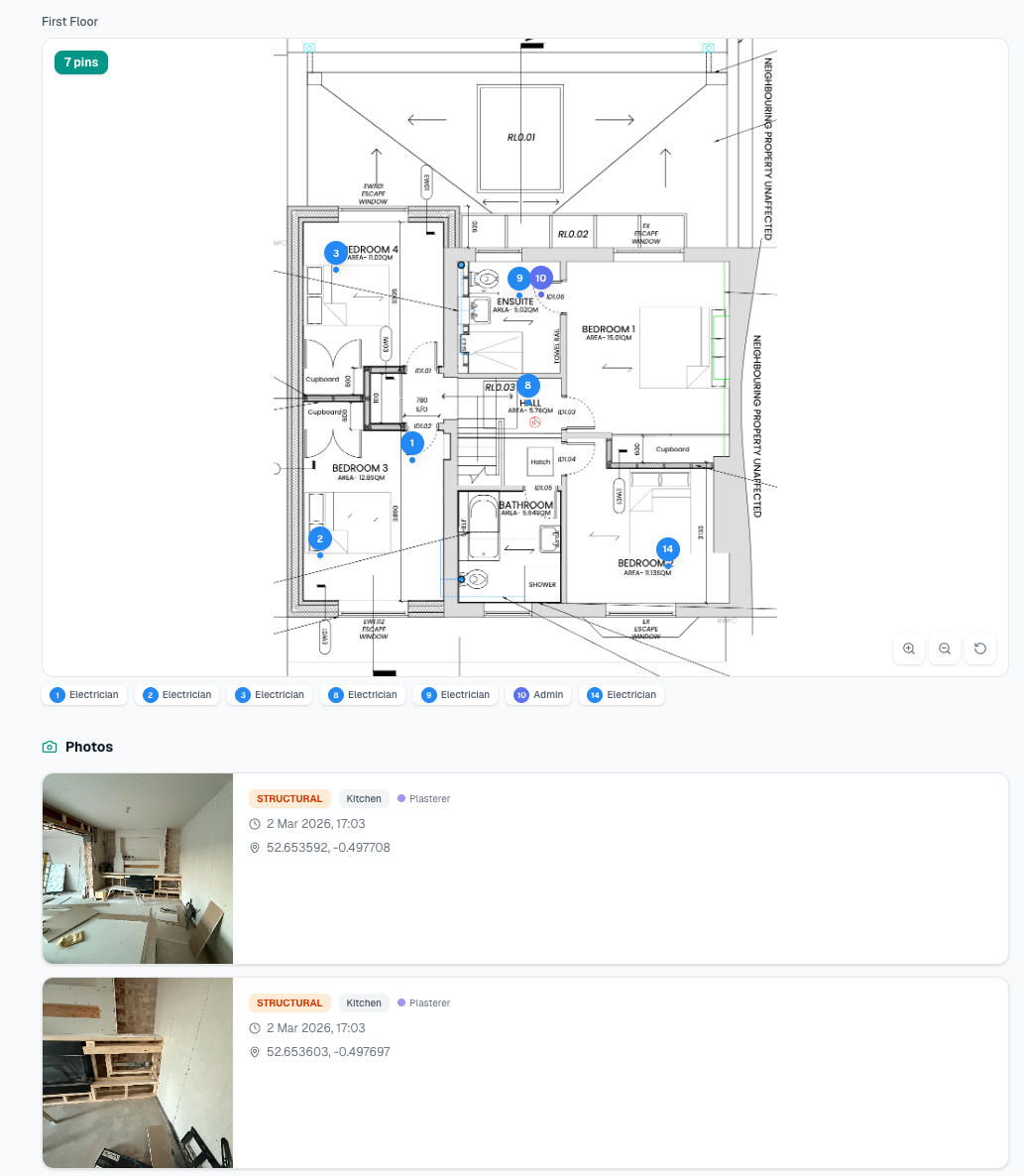
Floor plan view with numbered pins showing exactly where each trade photo was taken
Photos pinned to exact locations on your plans
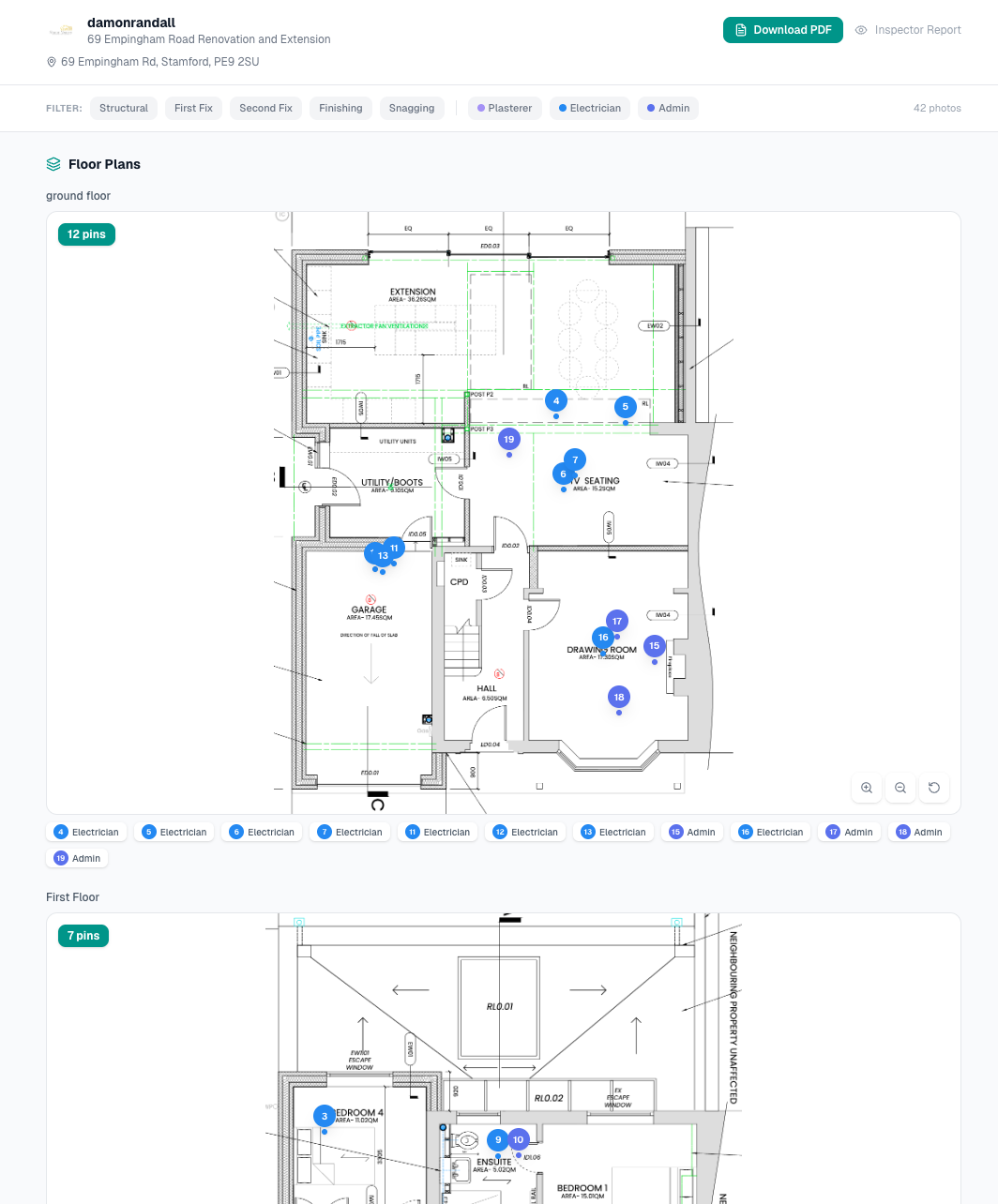
Inspector share link view with Download PDF button and filterable floor plans
One link. Inspector sees everything. No login needed.
Part L

Part L photo evidence, done right. Free.

The official Appendix B checklist, numbered the way Building Control reads it. GPS and time on every photo. Your trades scan a QR code — no app, no account. Export the pack free, on every plan.

It’s how a new home gets signed off.

Since June 2022, Approved Document L asks for a photo of each of 13 typical details on every new home, named by plot and detail number. The energy assessor reviews them for the as-built BREL report, and Building Control accepts the report with the photos as the evidence of compliance — without them, sign-off can be held up. The 2026 edition, from the Future Homes Standard, adds heat-pump pipework and the hot water cylinder for work notified from 24 March 2027.

Read the Part L photo guide — all 13 details, one by one →

13 details, six groups. SiteRecord lists every one.

1 Ground floor 1a–1c
2 Walls 2a–2b
3 Roof 3a–3b
4 Windows & doors 4a–4b
5 Airtightness 5
6 Building services 6a–6c

How SiteRecord delivers each requirement

The Appendix B checklist, built in

A photo of each typical detail (B7)

Named P1_3b, the way Building Control reads it

File names with plot and detail number (B8)

GPS and a server-set timestamp on every photo

Digital photos with location and time

Before / after pairs on SiteRecord

Insulation shown before it is covered

Export the Part L pack — free on every plan

Photos to the energy assessor and Building Control

Live inspector and SAP assessor links on SiteRecord

Progress they can check as you build

Your evidence, not your assessor’s

A record you keep, whoever does your SAP

Every requirement inspectors look for.

Timestamped photos

Every photo automatically tagged with date and time, down to the second

GPS location

Coordinates extracted from EXIF data or browser geolocation. Proves the photo was taken on site

Identifiable photographer

Every photo linked to a named trade with their role and trade type

Phase documentation

Photos tagged by construction phase — Demolition through to Snagging

Before & after evidence

Tag photos as Before or After. Pair them automatically by location for clear progress proof

Floor plan pinning

Pin photos to exact locations on uploaded floor plans. Visual evidence of what was done where

Shareable evidence

Export the Part L pack free, or send a live read-only link on SiteRecord. No login needed to view

Server-set timestamps

Every photo's upload time is set server-side and can't be changed after the fact. Capture time and GPS are recorded and labelled by source

Everything you need on site.
Nothing you don’t.

SiteRecord is built for one job — site evidence that holds up to inspection. Here’s what you get.

  • Timestamped, GPS-tagged photos
  • Part L Appendix B ready
  • Encrypted, GDPR compliant
  • Floor plan pinning & phase tagging
  • Inspector share links
  • PDF reports, one-tap
  • QR site access — no signup
  • No app download for trades
  • Offline sync
  • Free worker accounts (optional)
  • Live admin dashboard
  • Built in the UK

Twelve things that matter. Nothing else.

Workers

Workers, on the record.

The work they do is the site record. Now they own their part of it.

Most site software treats workers as anonymous QR scanners. SiteRecord still works that way if that’s what you need — scan, snap, done. But workers can also create a free account, install the PWA, and bring their work history with them.

🪪

One identity, every site

Sign in once. Work across multiple sites and multiple companies without re-scanning, re-registering, or re-explaining who you are.

📂

Your work, your record

Photos you've taken, sites you've worked, jobs you've contributed to — visible to you, owned by you. A portable record that follows you across employers.

🆓

Free, forever

Workers never pay. Companies pay for SiteRecord access; workers get a permanent account at no cost. Always.

Identity is optional. The QR code still works for anyone who wants the simplest path. Invited workers get a single-tap link — open the email, tap, you’re in. Free accounts are for workers ready to be seen.

For Solo Trades

For solo trades.

Sole trader or small team — SiteRecord protects your business every day. Photo evidence, dispute defence, compliance documentation, faster payment.

🛡️

Insurance claims

Timestamped, GPS-tagged photos prove your work was done correctly. When a claim comes in, you've got the evidence ready.

⚖️

Dispute protection

Customer says the work wasn't done? Before-and-after photos with dates and locations settle it fast.

📜

Part P & Gas Safe

Electrical and gas work needs documented evidence. SiteRecord gives you a compliance-ready photo log for every job.

💷

Get paid faster

Share a photo link with your client showing exactly what was done. No arguments, no delays — just proof of work.

Pricing

SiteRecord pricing

Per company, not per user — so growing your team never costs you more. Not the office team either: admin seats are unlimited, so promoting your foreman costs nothing. Keeps Building Control happy.

SiteRecord

Start free

No card. Every feature is yours for your first 14 days.

Free forever

1 admin (you) · 1 GB storage

Up to 3 active jobs
Unlimited site users via QR — no app, no account
GPS & timestamp on every photo
Floor plan pinning
Part L evidence pack export
Offline sync

Upgrade when you want

£29/mo, or £24/mo billed £288/yr (save £60) · 10 GB storage, ~9,900 photos

Unlimited jobs
Live inspector and SAP assessor links
PDF reports
Before / after pairs and markup
Team members with their own sign-in
Unlimited admin seats — foreman, office admin and PM included
Start free

We never auto-charge — there is no card on file until you choose to upgrade. Links you have shared keep working.

Prices exclude VAT. Annual is billed in full upfront. Extra storage £5 per 5 GB, added whenever you need it.

Photo estimates use our measured average of ~1 MB per photo (2048 px WebP plus its thumbnail) — the real figure from real jobs, not an assumption. Actual count depends on image complexity. Extra storage £5 per 5 GB, added whenever you need it.

A great product today. A platform tomorrow.

SiteRecord is a complete product in its own right — and the first of three in the Arqor OS, the operating system for UK trades. Each is purchasable alone, on the same login and the same data.

01 / Product LIVE

SiteRecord

Photo evidence and compliance documentation for the UK construction site. Floor plan pinning, QR site access, unlimited site users included — built for Part L and the Building Safety Act from the ground up.

  • › Floor plan pinning & phase tagging
  • › QR site access — no app, no signup
  • › Unlimited site users, included
  • › Part L and Building Safety Act ready

Live now, in daily use on UK sites — you're looking at it.

Start free →
02 / Product BUILDING

Arqor Office

The office side of the business: customers, quotes and invoices, scheduling, staff & time with a live crew map, receipts read by AI, and email built in. Tickets, certs and H&S are part of it, not a separate purchase — running with design partner firms now and opening to everyone soon.

  • › Customers, quotes & invoices — branded PDFs
  • › Scheduling + a live map of jobs and crew
  • › Staff & Time — one-tap clock in/out, payroll CSV
  • › Tickets, certs, expiry alerts & H&S records

Launching soon · 5 AI quotes a month, +3 per seat — finished quotes, not drafts. Manual quotes unlimited. Pricing announced at launch.

See what’s inside →
03 / Product ROADMAP

Arqor for Architects

Schedules of works drafted from the drawings and priced against real history, then straight out to tender — invite contractors, compare what comes back, award, and follow the job through construction. Coming after Office.

  • › 10 AI schedules a month, +3 per seat — unlimited manual editing
  • › Unlimited tender invitations & submissions
  • › Tender comparison, then award to a live project
  • › Contractors bid free — no account, nothing to buy to win

After Office · 10 AI schedules a month, +3 per seat — finished schedules, not drafts. Pricing announced when it opens.

Register interest →

Every pillar stands alone. Together, they’re The Arqor OS — all three for the price of two. Explore the OS →

FAQ

Common questions

Is there really a free version? +

Yes — SiteRecord Free, no card required. You get up to 3 active jobs, 1 GB of storage, unlimited site team members via QR, GPS-tagged photos, floor plan pinning, the Part L evidence pack export and offline sync. Premium tools — PDF reports, Before/After tagging, Markup, live inspector and SAP assessor links, and team management — are unlocked for the first 14 days from your first photo, and on SiteRecord.

What happens after the 14-day trial? +

Nothing. We don't auto-charge, ever — there's no card on file. You drop back to SiteRecord Free and keep everything you've already captured. When you're ready for premium tools, pick a plan in Settings.

Do I need to enter card details to start? +

No. Sign up with email, get a 6-digit code, you're in. No card, no commitment. Card details are only needed if you pick a paid plan.

What's the difference between free and paid? +

Free covers the photo log and the Part L pack — capture, pin, export, store, sync. SiteRecord adds the live side: inspector and SAP assessor links that update as you work, PDF reports, Before/After pairing, and the markup tool for annotating captured photos. Links you shared during your trial keep working.

What if I hit the 3 active job cap on free? +

Close a job to start another, or upgrade. Closed jobs stay searchable forever; the cap is on what's open at once, not what you've ever done. Paid plans remove the cap entirely.

What counts toward storage? +

Photos and floor plans only — no metadata, no audit log, no comments. Original-quality photos are downsized to 2048 px WebP on upload to keep counts predictable. Free starts at 1 GB. SiteRecord includes 10 GB — around 9,900 photos at our measured average — and you can add 5 GB at a time for £5 a month whenever you need it, so a busy year never hits a wall.

Do my trades need to download an app? +

No, and that is the point — a trade should never be the reason a job goes unrecorded. Trades scan a QR code and start taking photos in the browser: no account, no app store, no setup, and that stays true whatever else we ship. Workers who want a portable record of their own can install it to the home screen in two taps today, and native iOS and Android apps are in testing now — for the lads who want background location and push, never as a hoop anyone has to jump through.

Should I use the desktop or the mobile version? +

Both — they're the same account, built for different jobs. Use desktop (or a laptop) to set up jobs, upload floor plans, manage your team and pull reports — it's quicker on a bigger screen. Use mobile on site to capture photos: your team scans the QR or taps a link, and photos come timestamped, geo-stamped and pinned to the plan. Set up on desktop, capture on mobile.

Is my data safe? +

Yes. All data is cloud-hosted, encrypted in transit and at rest, GDPR compliant, and backed up daily. Photos carry a server-set upload time that can't be backdated, and each GPS reading is labelled by its source.

What about the other products — when do they ship? +

SiteRecord is live and in daily use. Arqor Office — customers, quotes, invoices, scheduling, timekeeping, and tickets, certs and H&S — is running with design partner firms now and opens to everyone soon — pricing announced at launch — with 5 AI-drafted quotes a month and 3 more per extra seat — finished quotes, not drafts, so redrafting one until it is right is still one. Arqor for Architects follows Office, with 10 AI schedules of works a month and 3 more per seat; its pricing is announced when it opens. On both, extra documents beyond the allowance are priced at roughly what they cost us to run. Nothing carries a date — we'd rather ship than promise.

Get in Touch

Questions? Drop us a line.

We usually reply within a few hours.

Email hello@arqor.io

Ready for clarity?

No card. Keep Free forever.

Start free